
Gemini Notebook
Google LLCProductivity
4.73.53K Reviews
- Version
- Varies With Device
- Installs
- 50.00M
- Age Rating
- Everyone
Screenshots
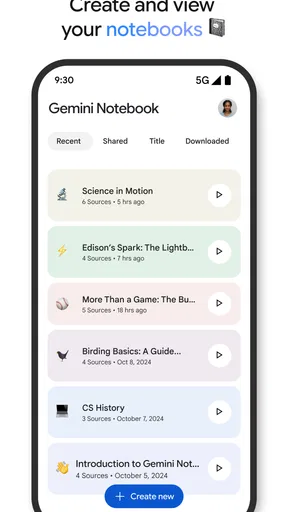
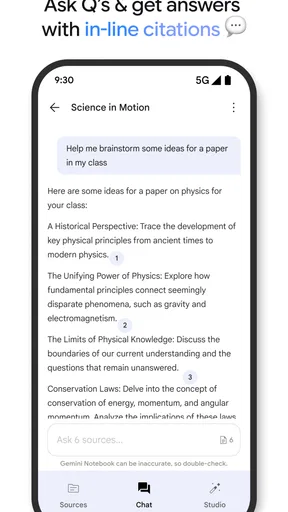
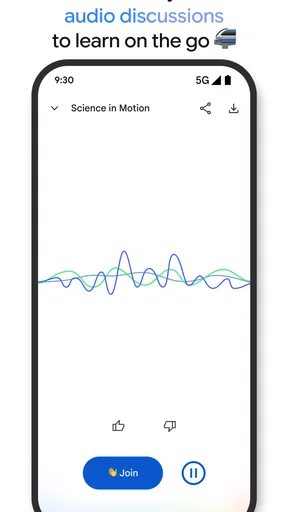
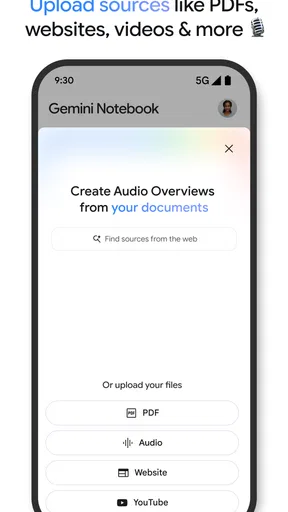
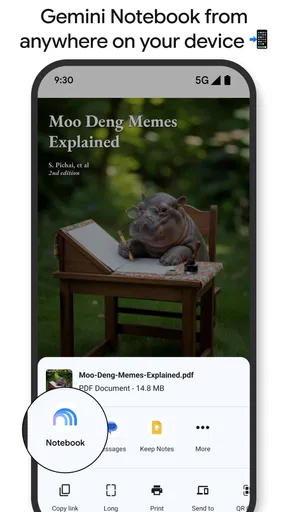
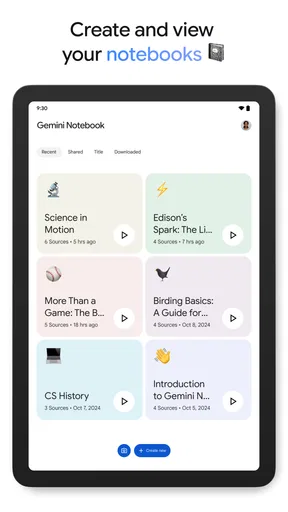
Our Review of Gemini Notebook
 Analysis by Appyee
I approached Gemini Notebook as a practical productivity tool rather than another general chatbot. Its purpose is to help me understand material through a more focused, personalized research workspace, and that distinction matters. Instead of opening a blank conversation every time I have a question, I can organize a subject around the material I am actually trying to study or interpret.
That makes it most interesting for people who regularly deal with articles, notes, study material, project research, or complicated topics that are easier to understand when kept together. I would not choose it simply because I wanted the fastest possible answer. I would choose it when I wanted to return to a subject, ask better follow-up questions, and build understanding gradually.
The app comes from Google LLC and sits in the productivity category. It is free, available to everyone from an age-rating perspective, and has already passed ten million installs. Its release was on May 16, 2025, so it feels like a relatively recent addition to the mobile research-tool space rather than a long-established note-taking classic.
How I would decide whether Gemini Notebook fits my workflow
The first question is not whether artificial intelligence can answer questions. Many apps can do that. The more useful question is whether I need a place where an AI assistant stays connected to a particular research subject. If the answer is yes, this app has a clearer reason to exist than a standard search box or an ordinary notes app.
I would judge it using four practical criteria: how easily I can understand unfamiliar information, how well the workspace supports continued research, whether the answers remain useful when the topic becomes complicated, and how much effort it takes to move my current material into a new system.
That last point is easy to overlook. A new productivity app can sound helpful but still become a burden if I have to reorganize everything before I see any benefit. Gemini Notebook is most appealing when I am starting a defined research task or when my existing notes are already grouped by subject. It is less compelling if I only want a quick reminder, a shopping list, or a simple text note.
I also look for a clear difference between assistance and replacement. A research assistant can help me summarize, compare, explain, and question information, but I still need to check important conclusions myself. That is especially true for schoolwork, work decisions, health-related reading, financial topics, or anything where a confident mistake would matter.
A focused workspace is more useful than a stream of disconnected chats
My favorite idea here is continuity. In a conventional AI chat, I often ask one question, receive an answer, and then lose the useful context among unrelated conversations. A notebook-style approach encourages me to keep one subject together and develop it over time.
For example, imagine I am preparing for a meeting about a new software project. I might begin by collecting background reading, then ask for a plain-language explanation of unfamiliar terms, then request a comparison of two approaches, and finally ask for a list of questions to raise with my team. Those requests make more sense as parts of one research process than as isolated prompts.
This is also where the app can help with active learning. Instead of asking only for a summary, I can use the material to generate possible questions, identify areas I do not understand, or ask for an explanation aimed at a beginner. The important habit is to make the assistant show relationships and gaps, not merely shorten everything.
The strongest workflow is question-led research, not passive reading. I would read a source first, write down what seems unclear, and then use the notebook to investigate those exact points. That approach keeps me involved and makes it easier to notice when an answer sounds polished but does not really address the evidence.
Three ways I would use it beyond a basic summary
My first less-obvious use would be a “confusion log.” Whenever I encounter a term or claim I cannot explain in my own words, I would add it to a running list and ask for explanations at different levels. The goal is not to collect impressive answers; it is to reach a point where I can restate the idea without assistance.
My second use would be contradiction hunting. When researching a subject with competing opinions, I would ask the assistant to separate claims, supporting reasons, assumptions, and unresolved questions. I would then return to the source material and verify the distinctions. This is more valuable than asking for a single supposedly neutral conclusion because it preserves the structure of the disagreement.
My third use would be meeting preparation. I could keep background notes in one place, ask for a short briefing before the meeting, and then use the same context afterward to turn rough notes into follow-up questions or action points. I would still edit the result personally, but the continuity could reduce the time spent reconstructing what the discussion was about.
A fourth useful workflow is progressive compression. I would first ask for a detailed explanation, then a short outline, then a version suitable for someone unfamiliar with the subject. Comparing those versions can reveal which ideas are essential and which details were merely supporting context. This is a better test of understanding than accepting the first short summary.
Where the app feels strongest
The biggest advantage is the combination of research assistance and organization. A general chatbot is convenient when I have one question. A regular note-taking app is dependable when I already know what I want to write. Gemini Notebook sits between those experiences: it is designed for the stage where I am still trying to understand, sort, and connect information.
That makes it particularly suitable for students, independent learners, writers planning a nonfiction project, and professionals who need to become familiar with a subject quickly. It can also help someone who finds a long article intimidating because the conversation can move from broad explanation to specific clarification.
I appreciate that the app is free. That lowers the cost of trying it as a supplement to an existing workflow. I do not have to abandon my current notes immediately or make a major purchase before deciding whether a notebook-centered AI assistant helps me think more clearly.
Its public reception is also encouraging: it holds a 4.8 average from around 291 thousand ratings, with roughly 2.9 thousand written reviews. I treat those figures as a sign of strong overall satisfaction, not as proof that every workflow will suit every person. Productivity tools are unusually personal, and a high average cannot tell me whether the organization style matches my habits.
The app’s age rating of Everyone makes it broadly approachable, but that should not be confused with automatic suitability for every kind of research. Younger users and beginners still need to learn how to question generated explanations. Accessibility of the interface does not remove the need for judgment.
A realistic everyday scenario
Suppose I have a free evening before starting a course module on a subject I have never studied. I would create a notebook around that subject, gather the material I am expected to read, and begin with a simple request: explain the central idea without assuming prior knowledge. Then I would ask which terms I should learn first and which parts of the material are likely to be confused with one another.
After reading, I would write my own short explanation and ask the assistant to point out missing connections or ambiguous wording. I would not ask it to complete the assignment for me. Instead, I would use it as a patient study partner that helps me test whether my understanding is coherent.
Before the next lesson, I could ask for practice questions based on the areas that caused difficulty. After answering them myself, I would compare my reasoning with a clear explanation and mark the subjects that still need attention. This workflow turns the app into a feedback loop rather than a shortcut.
The trade-off is that this takes more deliberate effort than typing a question into a general search engine. That is not a defect for a learner who wants to understand, but it may feel unnecessary for someone who only needs a definition or a single fact.
Where a familiar alternative may be better
I would stay with a traditional notes app if my priority were fast capture, reliable personal organization, or complete control over wording. A simple notes tool is often better for grocery lists, private journaling, checklists, meeting minutes, and information I do not want interpreted. It also keeps the writing process firmly in my hands.
I would choose a general search engine when I needed current web results, direct source discovery, or several independent pages to compare. Search is often the better first step when I do not yet know which sources deserve attention. Gemini Notebook becomes more valuable after I have material worth examining, rather than as a replacement for every form of browsing.
A general chatbot may be preferable when I want creative drafting, casual brainstorming, translation, coding help, or a one-off conversation that does not belong to a long-running research subject. Its broad flexibility can be more convenient than setting up a focused notebook for a small task.
For serious academic or professional research, I would also keep a dedicated reference system or document editor in the workflow. An AI assistant can help me interpret and organize ideas, but it should not be my only record of where claims came from. I would preserve original sources and write down citations or links separately when accuracy and traceability matter.
This is the central limitation: the app can make information feel organized before I have proved that it is correct. A smooth explanation may hide uncertainty, simplify an argument too aggressively, or connect ideas that should remain separate. I would therefore use it to improve my questions and structure my notes, not to outsource verification.
The cost of changing from my current tools
Because the app is free, the financial barrier is low. The real cost is attention. I have to decide which subjects deserve their own notebook, move or gather the relevant material, and develop a habit of returning to the same workspace instead of scattering questions across different apps.
That transition is worthwhile when a project lasts several sessions. It is probably not worthwhile for a task that will be finished in five minutes. I would begin with one active subject rather than importing my entire digital life. After a week of real use, I could tell whether the structure is helping me find answers or merely adding another place to maintain.
There is also a mental switching cost. A notebook encourages me to think in terms of projects and sources, while a normal chat encourages immediate questions. Neither approach is always superior. I would use the notebook for depth and continuity, then keep a lightweight notes app for quick capture and a search tool for discovery.
One practical tip is to give every research session a clear purpose. Instead of writing “help me understand this,” I would ask for a specific outcome such as a comparison, a beginner explanation, a list of unresolved issues, or feedback on my own summary. Specific prompts make it easier to judge whether the response was useful.
Another tip is to separate exploration from final writing. I would allow the assistant to suggest structures and questions during exploration, but I would rewrite important conclusions in my own words. That preserves my voice and makes errors easier to spot.
Who should try it, and who should skip it
I recommend giving Gemini Notebook a serious trial if you learn independently, work with complicated reading, or often return to the same subject over several days. It is especially promising for people who want more than a summary and need help turning scattered information into a sequence of understandable questions.
I would also recommend it to someone who feels overwhelmed by research but is willing to stay involved. The app can provide a useful middle layer between raw source material and personal understanding. Its best result is not that I read less; it is that I read with a clearer plan.
I would skip it if I mainly need a conventional notebook, a task manager, or a quick answer service. I would also avoid making it the sole tool for high-stakes decisions or source-sensitive work. In those cases, direct evidence, specialist advice, and a dependable record of references are more important than conversational convenience.
My final recommendation is positive, with a clear condition: use it as a research companion, not as an authority. The free price makes experimentation easy, the focused notebook concept gives it a meaningful place among productivity apps, and the strong 4.8 average suggests that many users find the experience valuable. For me, its real strength appears when I bring a defined topic, ask precise questions, challenge the explanations, and return to the same material over time.
If that sounds like the way you already learn or work, I think it is worth trying. If you only want fast notes or isolated answers, a simpler alternative may serve you better. Choose Gemini Notebook when the goal is understanding that develops over time, not merely information delivered in a moment.
Privacy and Permissions
See what permissions an app requests and how it handles your data.
- Identity
- find accounts on the device, add or remove accounts
- Contacts
- find accounts on the device
- Camera
- take pictures and videos
- Microphone
- record audio
- Other
- view network connections, change network connectivity, measure app storage space, full network access, change your audio settings, control vibration, prevent device from sleeping, read Google service configuration
Verdict
Strengths of Gemini Notebook
- Excellent for summarizing lengthy documents and research notes.
- Supports natural follow-up questions for exploring uploaded sources.
- Citations help connect answers to the original material.
- Useful for organizing ideas, drafts, and study notes in one place.
- Can reveal patterns and relationships across multiple references.
Limitations of Gemini Notebook
- Answer quality depends heavily on the accuracy of uploaded sources.
- Large or complex files may take time to process or analyze.
- Some advanced features may require a compatible Google account or plan.
- AI responses can still contain omissions or incorrect interpretations.
- Privacy concerns may matter when uploading confidential documents.
Other Releases by Google LLC
View All
Google Calendar
Productivity4.6

Google Messages
Communication4.6

Tools4.0

Google TV
Video Players & Editors3.9
Similar Picks in This Category
View AllGoogle Calendar
Google LLC4.6

Google Drive
Google LLC4.3

Google Assistant
Google LLC3.9

Microsoft OneDrive
Microsoft Corporation4.6

Samsung Calendar
Samsung Electronics Co., Ltd.4.1

Microsoft OneNote: Save Notes
Microsoft Corporation4.6
Frequently Asked Questions
What is Gemini Notebook, and what can I use it for?
Gemini Notebook is an AI-powered workspace designed to help you organize, understand, and work with your own reference materials. You can typically add documents, notes, or other supported sources and ask questions about their contents. It is useful for studying, summarizing reports, preparing research notes, comparing information, and turning lengthy material into clearer explanations without manually searching every page.
Does Gemini Notebook provide accurate answers based on my documents?
Gemini Notebook can make research and note-taking much faster, but its answers should not be treated as automatically perfect. The app may misunderstand context, overlook important details, or generate an incorrect interpretation, especially when the source material is incomplete or complicated. Always review the original documents and verify important facts before using its responses for academic, professional, legal, financial, or medical decisions.
Can I use Gemini Notebook on Android, iPhone, or the web?
Availability may depend on the version of Gemini Notebook, your Google account, country, device, and the current rollout of Google’s services. Some features may be offered through a web interface before appearing in a dedicated mobile app, while others may require an updated Android or iOS application. Check the official listing and supported-platform information before downloading, since access and features can change over time.
Is my information private when I upload files to Gemini Notebook?
Before importing personal, confidential, or work-related material, read the current privacy policy and account settings carefully. Uploaded sources may be processed by Google’s cloud-based AI systems, and handling can depend on your account type, product settings, and applicable regional policies. Avoid adding passwords, private identification documents, sensitive client data, or confidential company files unless you have confirmed that the service is appropriate for that information.
Is Gemini Notebook free to download and use?
Gemini Notebook may offer free access, but the available tools, usage limits, storage, model options, and advanced features can vary by account or subscription plan. A free option does not necessarily mean every function is included without restrictions. Review the official app page and in-app pricing details before relying on it for regular study or professional work, particularly if you expect to upload many documents or use advanced AI features.
